First of all, I am gonna talk about what cURL is then I will tell you what it does.
cURL is an extension in PHP which allows your PHP server to access other websites, sending and receiving information via a URL-like protocol. (You'll most commonly use HTTP, which lets you talk to other web pages, and FTP, which allows you to upload and download files.) In practical terms, this means you can have your server imitate a web browser, go to other sites, and download their web pages into a variable of your choosing.
cURL is a vital tool for any serious online shopping cart, because it allows you to approve credit card charges and get live shipping quotes for customers. You use cURL to connect and send transaction data to another company's server. The server replies, telling you information such as whether the charge was approved or denied and why.
Please leave your comments down below about how you found this post. I am pretty sure it will help you in some way.
Sunday, 4 April 2010


Saturday, 3 April 2010
What is PHPinfo() ?
When you are working with PHP, this is the all important question!
Basically, this is a function, a built-in function I might add is having all the info about your web server.
It lets you know where you configuration file is stored (i.e. the php.ini file) and the version of PHP you are using.
Not only that, the information about the session variable the cookies and much more. Not to mention it also lets you know what extensions are loaded in the server. What extensions are in PHP, I will let you know in my next post.
Keep reading and keep tuned in!
Thanks!
Basically, this is a function, a built-in function I might add is having all the info about your web server.
It lets you know where you configuration file is stored (i.e. the php.ini file) and the version of PHP you are using.
Not only that, the information about the session variable the cookies and much more. Not to mention it also lets you know what extensions are loaded in the server. What extensions are in PHP, I will let you know in my next post.
Keep reading and keep tuned in!
Thanks!
Thursday, 4 February 2010
How to Install IIS (Internet Information Server) on Windows 7
In this tutorial I will take you through various steps on how to install IIS on your Windows 7 computer.
Remember you do have built in (but not active) IIS server on your windows 7 machine but you need to install it. When I installed it on my machine it didn't ask me for a CD just copied all the necessary files from Windows folder.
Anyways just begin installing IIS on Windows 7:-
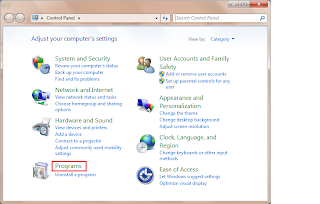
Step 1: Go to your Start menu in Windows 7 and select Control panel:
Step 2: Click on Programs.
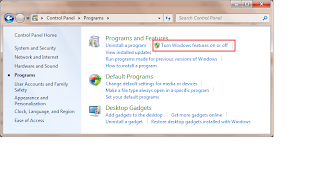
Step 3: Select Turn Windows Feature on or off
Step 4: Select as it is shown in the screen below.
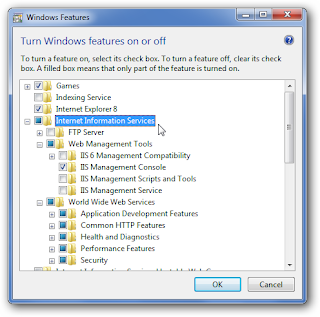
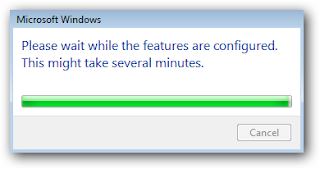
Step 5: Hit the Ok button and you will see the IIS being installed as shown on the screen.
Step 6: Open Firefox or Internet Explorer or any of your favourite browser.
Step 7: Type in the url bar http://localhost
and if now if everything went OK as it should then you should be able to see this screen.
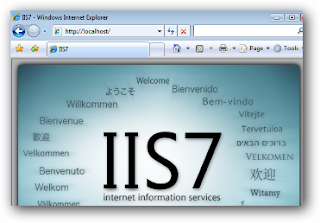
Thanks for reading this article and please leave your comments down below.
Cheers!
Remember you do have built in (but not active) IIS server on your windows 7 machine but you need to install it. When I installed it on my machine it didn't ask me for a CD just copied all the necessary files from Windows folder.
Anyways just begin installing IIS on Windows 7:-
Step 1: Go to your Start menu in Windows 7 and select Control panel:
Step 2: Click on Programs.

Step 3: Select Turn Windows Feature on or off

Step 4: Select as it is shown in the screen below.

Step 5: Hit the Ok button and you will see the IIS being installed as shown on the screen.

Step 6: Open Firefox or Internet Explorer or any of your favourite browser.
Step 7: Type in the url bar http://localhost
and if now if everything went OK as it should then you should be able to see this screen.

Thanks for reading this article and please leave your comments down below.
Cheers!
Tuesday, 26 January 2010
How to use Date function in PHP
Hey guys in this post I am gonna talk about using Date function.
By the way, anything ending with the brackets sign indicates that this is a function. for example Myfunction()
And I was talking about the Date function or Date() it expects the argument you pass it to be a format string, representing the style of output you would like. Each letter in the string represents one part of the date and time. H is the hour in a 24-hour format with leading zeros where required, i is the minutes with a leading zero where required, j is the day of the month without a leading zero, S represents the ordinal suffix (in this case th), and F is the full name of the month.
This is how it looks like when we have entered the required parameters ( or arguments):
date('H:i, jS F')
Cheers!
By the way, anything ending with the brackets sign indicates that this is a function. for example Myfunction()
And I was talking about the Date function or Date() it expects the argument you pass it to be a format string, representing the style of output you would like. Each letter in the string represents one part of the date and time. H is the hour in a 24-hour format with leading zeros where required, i is the minutes with a leading zero where required, j is the day of the month without a leading zero, S represents the ordinal suffix (in this case th), and F is the full name of the month.
This is how it looks like when we have entered the required parameters ( or arguments):
date('H:i, jS F')
Cheers!
Using PHP tag in PHP file
We can always use the tag:
< ? php
echo '
? >
This is a PHP tag and this goes inside a .PHP file extension.
< ? php
echo '
This is a PHP tag
';? >
This is a PHP tag and this goes inside a .PHP file extension.
Sunday, 25 October 2009
I am now in Malir City
This is a good place as I am now with my family and relatives.
Enjoy and have fun!
Enjoy and have fun!
Sunday, 17 May 2009
Thursday, 2 August 2007

Friday, 27 July 2007

Sunday, 24 June 2007
A nice victory sign and a laptop
Hey I like this victory sign Also the guy working on the Laptop near the seaside
 And what do you have to say about this laptop. Cool eh?

 Also the guy working on the Laptop near the seaside
 And what do you have to say about this laptop. Cool eh?
Cheers!
Subscribe to:
Posts
(
Atom
)
