This is a good place as I am now with my family and relatives.
Enjoy and have fun!
Sunday, 25 October 2009


Sunday, 17 May 2009
Thursday, 2 August 2007

Friday, 27 July 2007

Sunday, 24 June 2007
A nice victory sign and a laptop
Hey I like this victory sign Also the guy working on the Laptop near the seaside
 And what do you have to say about this laptop. Cool eh?

 Also the guy working on the Laptop near the seaside
 And what do you have to say about this laptop. Cool eh?
Cheers!
Thursday, 10 May 2007
Sunday, 22 April 2007
Good resourses to check out!
I hope you will surely find this resource useful http://technorati.com/
Do check it out and let me know!
Thanks!
^_^
Do check it out and let me know!
Thanks!
^_^
Wednesday, 11 April 2007
Setting up Database in Dreamweaver 8 without writing any codes
It is again quite easy to setup your database using your favourite Dreamweaver 8 without writing any codes . If you are working with PHP4 or PHP5 you can always set it up smoothly as possible. 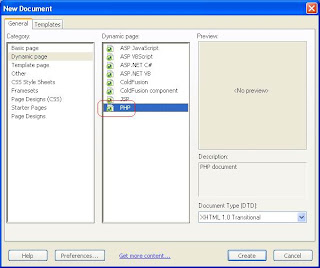
Congrats! you've just setup the the database connection without writing any codes yourself. Now just switch over to the code window and see that code Dreamweaver 8 has generator for you. Ewww lots of code isn't.
I would assume that you have already opened up your favourite Dreamweaver 8. Get ready for easy step-by-step learning!
If you are working with PHP then the way to select it is by going to the File-> New and then selecting PHP the way it is shown below in the picture
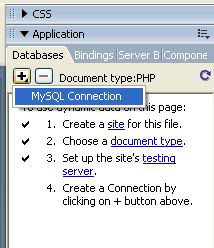
Now to setup, yes to setup the database (Here we are using MySql as a database for PHP) we simply go to the applicatin panel and click the + sign as shown in the picture below
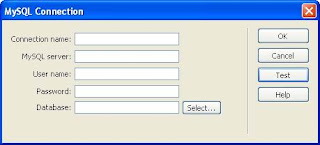
And then MySql Connection window opens up. Follow these easy steps now:
Connection name = conPHP (or whanever you like)
MySql Server = localhost (if you are using it on a local computer i.e your own computer)Username = root (Thi is the default user name. You can even enter the one you've defined)password = (I've not specified any password so I'm gonna leave it blank)
Database = DbName (You can either type it or select one by clicking on the select button)
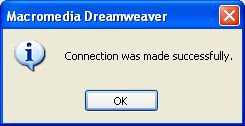
After entering all the details hit the Test button. If everything goes fine you'll see this dialog show below:
Congrats! you've just setup the the database connection without writing any codes yourself. Now just switch over to the code window and see that code Dreamweaver 8 has generator for you. Ewww lots of code isn't.
Isn't Dreamweaver 8 Great?!!
Thanks for viewing!
Let me now if you it was helpful to you
Thanks agian !!
Setting up Database in Dreamweaver 8 without writing any codes
It is again quite easy to setup your database using your favourite Dreamweaver 8 without writing any codes . If you are working with PHP4 or PHP5 you can always set it up smoothly as possible.
Congrats! you've just setup the the database connection without writing any codes yourself. Now just switch over to the code window and see that code Dreamweaver 8 has generator for you. Ewww lots of code isn't.
I would assume that you have already opened up your favourite Dreamweaver 8. Get ready for easy step-by-step learning!
If you are working with PHP then the way to select it is by going to the File-> New and then selecting PHP the way it is shown below in the picture
Now to setup, yes to setup the database (Here we are using MySql as a database for PHP) we simply go to the applicatin panel and click the + sign as shown in the picture below
And then MySql Connection window opens up. Follow these easy steps now:
Connection name = conPHP (or whanever you like)
MySql Server = localhost (if you are using it on a local computer i.e your own computer)Username = root (Thi is the default user name. You can even enter the one you've defined)password = (I've not specified any password so I'm gonna leave it blank)
Database = DbName (You can either type it or select one by clicking on the select button)
After entering all the details hit the Test button. If everything goes fine you'll see this dialog show below:
Congrats! you've just setup the the database connection without writing any codes yourself. Now just switch over to the code window and see that code Dreamweaver 8 has generator for you. Ewww lots of code isn't.
Isn't Dreamweaver 8 Great?!!
Thanks for viewing!
Let me now if you it was helpful to you
Thanks agian !!
Monday, 2 April 2007
Learning Dreamweaver 8
Ahem...so you wanna learn Dreamweaver 8 eh?
I would recommend you to go and and read the book titled: 'Sams Sams Teach Yourself Macromedia Dreamweaver 8 in 24 Hours' as it will really get you started from day 1 or rather hour 1
:-)
Please let me know if you find this info helpful.
Thanks and cheers!
I would recommend you to go and and read the book titled: 'Sams Sams Teach Yourself Macromedia Dreamweaver 8 in 24 Hours' as it will really get you started from day 1 or rather hour 1
:-)
Please let me know if you find this info helpful.
Thanks and cheers!
Subscribe to:
Posts
(
Atom
)
